GPU runners for GitHub Actions
10x cheaper GPU runners with NVIDIA or AMD GPUs for GitHub Actions.
If you want to self-host GitHub Actions runners with GPU support on AWS, RunsOn gives you access to the full range of EC2 instances to act as self-hosted GitHub Actions runners.
You can select specific GPU instances for NVIDIA (T4, A10G, L4, L40S, M60, V100, A100, H100, H200) and AMD (Radeon Pro V520) for your workflows, for much cheaper than the official GitHub Actions GPU runners.
There is also no GitHub plan restriction (i.e. available for all GitHub plans, even free plans).
Pricing
Per-minute costs including compute + 40GB gp3 EBS storage. Reduce egress costs further with Magic Cache.
Spot prices, us-east-1. Actual costs vary by region, time of day, and instance type selected.
Using RunsOn GPU Images
Since v2.6.5, RunsOn provides official gpu images that are pre-configured with the latest NVIDIA driver, CUDA toolkit, and container toolkit, in addition to the standard set of software coming from the full images.
This greatly speeds up the setup of your workflows, and it is recommended for most use cases.
| Image | Description |
|---|---|
| ubuntu22-gpu-x64 | x64 image compatible with official Ubuntu 22.04 GitHub runner image
+ NVIDIA driver, CUDA toolkit, container toolkit. |
| ubuntu24-gpu-x64 | x64 image compatible with official Ubuntu 24.04 GitHub runner image
+ NVIDIA driver, CUDA toolkit, container toolkit. |
| ubuntu24-gpu-arm64 | arm64 image for NVIDIA GPU runners on Graviton-based instances such as g5g
+ NVIDIA driver, CUDA toolkit, container toolkit. |
Workflow job definition
# .github/workflows/machine-learning-job.yml
jobs:
  default:
    runs-on: "runs-on=${{ github.run_id }}/family=g4dn.xlarge/image=ubuntu24-gpu-x64"
    steps:
      - name: Display NVIDIA SMI details
        run: |
          nvidia-smi
          nvidia-smi -L
          nvidia-smi -q -d Memory
      - name: Ensure Docker is available with GPU support
        run: docker run --rm --runtime=nvidia --gpus all ubuntu nvidia-smi
      - name: Execute your machine learning script
        run: echo "Running ML script..."
For ARM64 GPU workloads, use the built-in ubuntu24-gpu-arm64 image with a compatible family such as g5g:
jobs:
  arm64-gpu:
    runs-on: "runs-on=${{ github.run_id }}/family=g5g.xlarge/image=ubuntu24-gpu-arm64"
    steps:
      - name: Display NVIDIA SMI details
        run: |
          nvidia-smi
uname -mOutput:
+-----------------------------------------------------------------------------------------+
| NVIDIA-SMI 565.57.01              Driver Version: 565.57.01      CUDA Version: 12.7     |
|-----------------------------------------+------------------------+----------------------+
| GPU  Name                 Persistence-M | Bus-Id          Disp.A | Volatile Uncorr. ECC |
| Fan  Temp   Perf          Pwr:Usage/Cap |           Memory-Usage | GPU-Util  Compute M. |
|                                         |                        |               MIG M. |
|=========================================+========================+======================|
|   0  Tesla T4                       On  |   00000000:00:1E.0 Off |                    0 |
| N/A   23C    P8              9W /   70W |       1MiB /  15360MiB |      0%      Default |
|                                         |                        |                  N/A |
+-----------------------------------------+------------------------+----------------------+

+-----------------------------------------------------------------------------------------+
| Processes:                                                                              |
|  GPU   GI   CI        PID   Type   Process name                              GPU Memory |
|        ID   ID                                                               Usage      |
|=========================================================================================|
|  No running processes found                                                             |
+-----------------------------------------------------------------------------------------+
GPU 0: Tesla T4 (UUID: GPU-b450c1c0-3d7f-73bd-5267-326581126cc8)

...
Using NVIDIA Deep Learning AMIs
Combined with the ability to bring your own or third-party images, you can make use of the official Deep Learning AMIs ↗ (DLAMI) provided by AWS to get your Machine Learning and AI workflows running in no time on GitHub Actions.
To get started with GPU runners, we recommend that you define a custom image configuration referencing the latest Deep Learning AMI, and then define a custom runner configuration referencing that image and the GPU instance type that you want to use.
Configuration file
# .github/runs-on.yml
images:
  dlami-x64:
    platform: "linux"
    arch: "x64"
    owner: "898082745236" # AWS
    name: "Deep Learning Base OSS Nvidia Driver GPU AMI (Ubuntu 22.04)*"

runners:
  gpu-nvidia:
    family: ["g4dn.xlarge"]
    image: dlami-x64
Workflow job definition
# .github/workflows/machine-learning-job.yml
jobs:
  default:
    runs-on: "runs-on=${{ github.run_id }}/runner=gpu-nvidia"
    steps:
      - uses: actions/setup-node@v4
        with:
          node-version: 20
      - name: Display environment details
        run: npx envinfo
      - name: Display block storage
        run: sudo lsblk -l
      - name: Display NVIDIA SMI details
        run: |
          nvidia-smi
          nvidia-smi -L
          nvidia-smi -q -d Memory
      - name: Ensure Docker is available
        run: docker run hello-world
      - name: Execute your machine learning script
        run: echo "Running ML script..."
Note that runners will take a bit more time than usual to start due to the base image being very large (multiple versions of Cuda, etc.). If you know exactly what you require, you could create a more streamlined custom image with only what you need, using the Building custom AMI with packer guide.
Cost
GitHub provides GPU runners (gpu-t4-4-core) with 4 vCPUs, 28GB RAM and a Tesla T4 GPU with 16GB VRAM, for $0.07/min.
By comparison, even with on-demand pricing, the cost of running a GPU runner with the same Tesla T4 GPU card, 4vCPUs, and 16GB RAM (g4dn.xlarge) on AWS with RunsOn is $0.009/min, i.e. 85% cheaper. If using spot pricing, the cost is even lower, at $0.004/min, i.e. more than 10x cheaper.
Enjoy!
Quotas
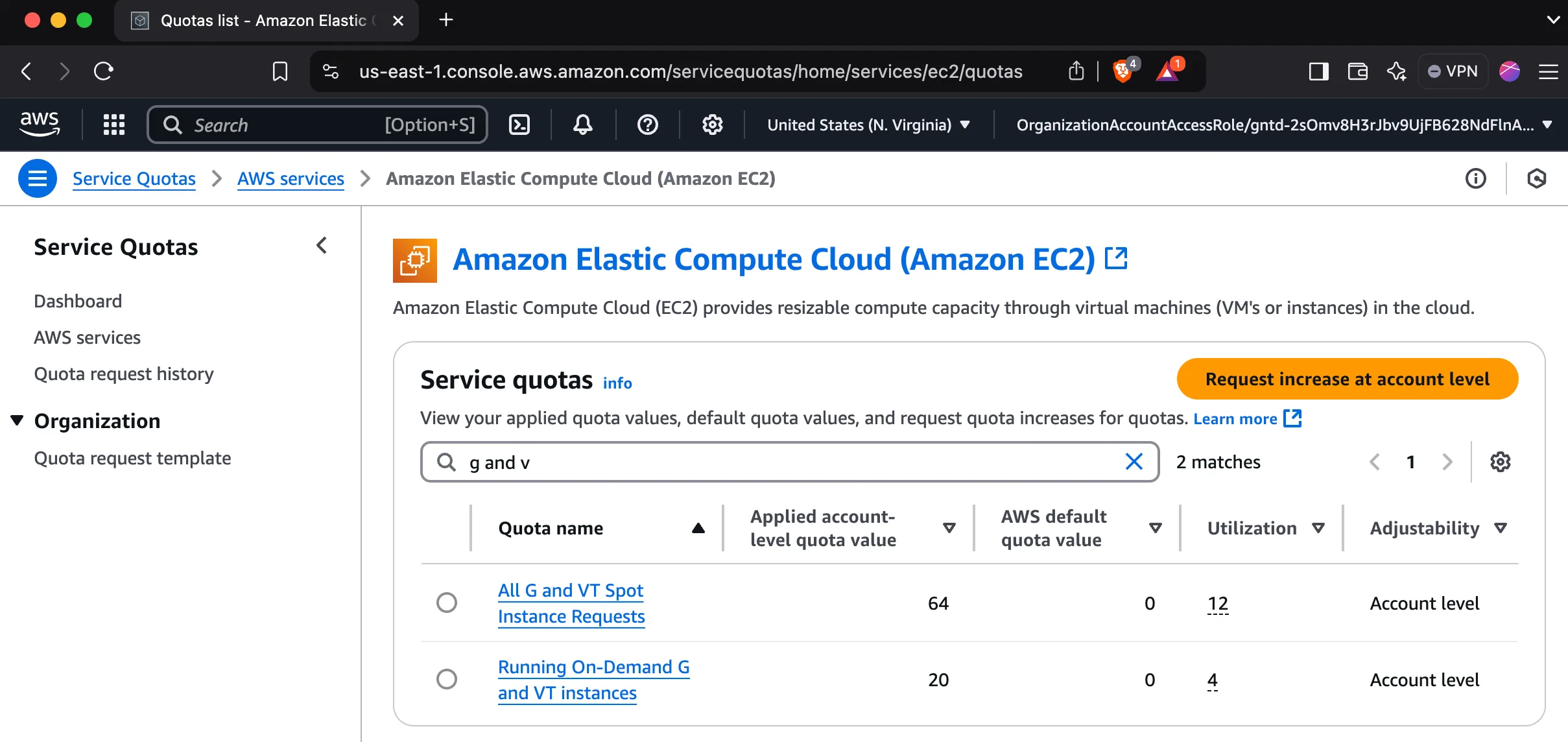
Note that new AWS accounts have quotas set to zero by default for GPU-enabled instances, so you will likely need to request an increase.
How to request an increase
- Search for “Quotas” in the AWS console.
- Click on “Request quota increase”.
- Select “EC2” as the service.
- Select “G” as the instance type.
- Fill in the form and submit.
- Repeat for both spot and on-demand quotas.