
StepSecurity: Protecting CI/CD Runners from Supply Chain Attacks
StepSecurity integration with RunsOn provides CI/CD runtime protection against supply chain attacks. Monitor network egress, detect code tampering, enforce least-privilege access. Secure GitHub Actions workflows.
Corporate laptops and production servers typically have robust security monitoring in place to reduce risk and meet compliance requirements. However, CI/CD runners, which handle sensitive information like secrets for package registries and cloud environments and create production builds, often lack such security measures. This oversight has led to significant supply chain attacks, including the SolarWinds and Codecov breaches.
Traditional security monitoring and EDR solutions are ineffective for CI/CD runners due to their ephemeral nature. These tools also lack the necessary context to correlate events with specific workflow runs in a CI/CD environment.
StepSecurity ↗ addresses this gap by providing security monitoring tailored for CI/CD runners. StepSecurity Harden-Runner is a runtime security agent for CI/CD runners, offering features such as:
- Egress network monitoring and filtering: Harden-Runner monitors outbound network traffic to build a baseline for each job, which is then used to detect anomalies and can be enforced as an allow list to block unauthorized connections.
- Monitoring calls to GitHub APIs: The tool monitors outbound HTTPS requests to GitHub APIs, providing visibility into API usage and helping determine the minimum required
GITHUB_TOKENpermissions for workflows. - File integrity and tampering detection: Harden-Runner detects unauthorized modifications to source code during the build process, alerting users to potential tampering attempts.
- Granular Event Correlation: Each network connection, file operation, and process execution are mapped to the exact step, job, and workflow where it occurs
- GitHub Checks integration: Harden-Runner integrates directly with the GitHub Checks UI, automatically monitoring network activity across workflow runs in a pull request and failing the check if anomalous activity is detected.
With StepSecurity organizations can mitigate the risk of supply chain attacks and meet compliance requirements specific to their CI/CD infrastructure. This approach brings CI/CD runners under the same level of security scrutiny as other critical systems, addressing a significant gap in the software supply chain.
Getting Started with StepSecurity on RunsOn
-
Get a StepSecurity API Key
- You need a StepSecurity Enterprise License.
- If you don’t have a license, you can start a free trial at StepSecurity ↗.
-
Configure RunsOn – Enter your StepSecurity API key when setting up or upgrading RunsOn, with the
IntegrationStepSecurityApiKeystack parameter. -
Use StepSecurity images in your workflows. Here is the list of all StepSecurity images natively supported by RunsOn:
ubuntu24-stepsecurity-x64ubuntu24-stepsecurity-arm64
# .github/workflows/secured-workflow.yml
jobs:
  build:
    runs-on:
      - runs-on=${{ github.run_id }}
      - runner=2cpu-linux-x64
- image=ubuntu24-stepsecurity-x64- Visit your StepSecurity dashboard ↗ to review the runtime insights report for network, process, and file activities.
Example
- Here is an example workflow ↗ that uses StepSecurity images with RunsOn:
name: RunsOn Tests

on:
  workflow_dispatch:

jobs:
  test-host-outbound:
    runs-on:
      - runs-on=${{ github.run_id }}
      - runner=2cpu-linux-x64
      - image=ubuntu24-stepsecurity-x64
    steps:
      - name: Harden Runner
        uses: step-security/harden-runner@rc
        with:
          egress-policy: audit
          allowed-endpoints: >
            github.com:443
            goreleaser.com:443

      - name: Checkout code
        uses: actions/checkout@v6

      - name: Run outbound calls from host
        run: |
          start_time=$(date +%s)
          end_time=$((start_time + 90))  # 5 minutes = 300 seconds

          while [ $(date +%s) -lt $end_time ]; do
            curl -I https://www.google.com
            curl -I https://goreleaser.com
            sleep 10  # wait 10 seconds between calls
          done

  test-docker-outbound:
    runs-on:
      - runs-on=${{ github.run_id }}
      - runner=2cpu-linux-x64
      - image=ubuntu24-stepsecurity-x64
    steps:
      - name: Harden Runner
        uses: step-security/harden-runner@rc
        with:
          egress-policy: block
          allowed-endpoints: >
            archive.ubuntu.com:80
            github.com:443
            goreleaser.com:443
            production.cloudflare.docker.com:443
            docker-images-prod.6aa30f8b08e16409b46e0173d6de2f56.r2.cloudflarestorage.com:443
            *.docker.io:443
            security.ubuntu.com:80

      - name: Checkout code
        uses: actions/checkout@v6

      - name: Run outbound calls from within Docker container
        continue-on-error: true
        run: |
          # Start the container
          docker run --rm -d --name test-container ubuntu:latest sleep 90

          # Install curl in the container
          docker exec test-container apt-get update
          docker exec test-container apt-get install -y curl

          # Print /etc/resolv.conf from the container
          docker exec test-container cat /etc/resolv.conf

          # Make outbound calls
          for i in {1..9}; do
            docker exec test-container curl -I https://www.google.com
            docker exec test-container curl -I https://goreleaser.com
            sleep 10  # wait 10 seconds between calls
          done

          # Stop the container
          docker stop test-container


  test-docker-build-outbound:
    runs-on:
      - runs-on=${{ github.run_id }}
      - runner=2cpu-linux-x64
      - image=ubuntu24-stepsecurity-x64
    steps:
      - name: Harden Runner
        uses: step-security/harden-runner@rc
        with:
          egress-policy: audit
          allowed-endpoints: >
            archive.ubuntu.com:80
            auth.docker.io:443
            github.com:443
            goreleaser.com:443
            production.cloudflare.docker.com:443
            docker-images-prod.6aa30f8b08e16409b46e0173d6de2f56.r2.cloudflarestorage.com:443
            registry-1.docker.io:443
            security.ubuntu.com:80

      - name: Checkout code
        uses: actions/checkout@v6

      - name: Build Docker image and test outbound calls during build
        continue-on-error: true
        run: |
          # Create a Dockerfile that installs curl and makes outbound calls
          cat <<EOF > Dockerfile
          FROM ubuntu:latest
          RUN apt-get update && apt-get install -y curl
          RUN for i in {1..9}; do curl -I https://www.google.com && curl -I https://goreleaser.com; sleep 10; done
          EOF

          # Build the Docker image
          docker build -t test-image .

          # Print /etc/resolv.conf from the build container (temporary container used during build)
          container_id=$(docker create test-image)
          docker start $container_id
          docker exec $container_id cat /etc/resolv.conf
          docker stop $container_id
          docker rm $container_id

      - name: Print Docker logs with journalctl
        run: |
            sudo journalctl -u docker.service --no-pager
        shell: bash

  test-long-running-docker:
    runs-on:
      - runs-on=${{ github.run_id }}
      - runner=2cpu-linux-x64
      - image=ubuntu22-stepsecurity-x64
    steps:
      - name: Harden Runner
        uses: step-security/harden-runner@rc
        with:
          egress-policy: block
          allowed-endpoints: >
            archive.ubuntu.com:80
            auth.docker.io:443
            github.com:443
            goreleaser.com:443
            production.cloudflare.docker.com:443
            registry-1.docker.io:443
            docker-images-prod.6aa30f8b08e16409b46e0173d6de2f56.r2.cloudflarestorage.com:443
            security.ubuntu.com:80


      - name: Checkout code
        uses: actions/checkout@v6

      - name: Run long-running Docker container with outbound calls
        continue-on-error: true
        run: |
          # Start the long-running container
          docker run --rm -d --name long-running-container ubuntu:latest bash -c "
            apt-get update && apt-get install -y curl &&
            while true; do
              curl -I https://www.google.com;
              curl -I https://goreleaser.com;
              sleep 10;
            done
          "

          # Print /etc/resolv.conf from the container
          docker exec long-running-container cat /etc/resolv.conf

          # Let the container run for 5 minutes
          sleep 90

          # Stop the container
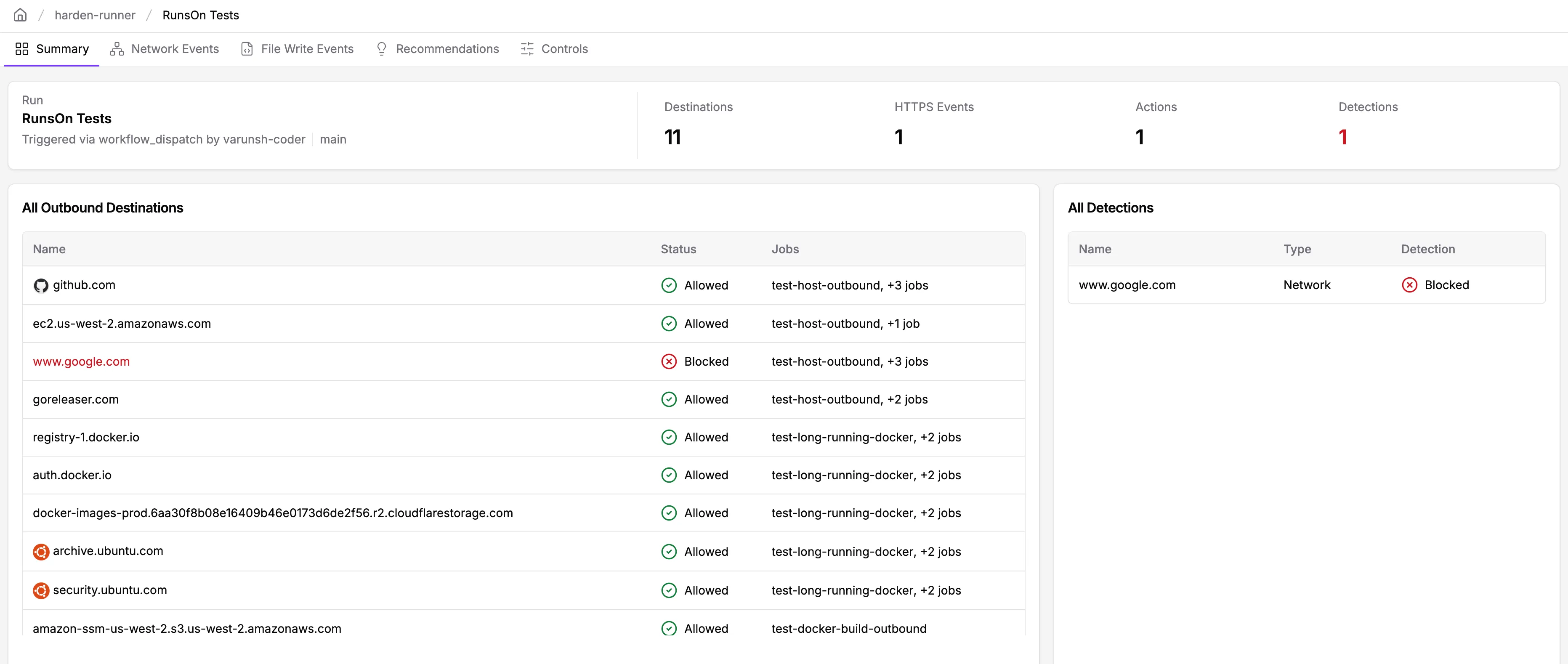
docker stop long-running-container- You can view the security insights ↗ for this workflow run:
FAQ
How much does StepSecurity cost?
StepSecurity pricing is based on the number of contributing developers in protected repositories. See the StepSecurity pricing page ↗ for details.
RunsOn integration comes at no additional cost to your existing RunsOn license.
Does Harden-Runner impact CI/CD performance?
No, Harden-Runner is optimized for low overhead. It monitors activity efficiently without slowing down builds.
Can I use the Harden-Runner community tier with RunsOn?
No, the Harden-Runner community tier only works with GitHub-hosted runners. Self-hosted runners with RunsOn will need a StepSecurity enterprise license.