Skip to content

github

12 posts with the tag “github”

BuildJet Is Shutting Down. What Should GitHub Actions Teams Do Next?

BuildJet just announced it is shutting down in a post titled We are shutting down.

Their core reason is straightforward:

“The gap we set out to fill has largely closed, and we’ve decided to focus our efforts elsewhere.”

First, credit where it is due: BuildJet helped validate and grow the market for third-party GitHub Actions runner services.

If you are affected by the shutdown, this post covers:

  • what this likely says about the market,
  • how to evaluate your replacement options,
  • why RunsOn is a strong BuildJet alternative.

Is the GitHub Actions ecosystem consolidating?

Section titled “Is the GitHub Actions ecosystem consolidating?”

Short answer: probably yes.

GitHub has shipped steady improvements in hosted runners, larger runner options, and overall platform capabilities. That naturally compresses the space for thin wrappers around default runner infrastructure.

What remains valuable now is not just “hosted runners, but cheaper.” Teams increasingly need:

  • stronger workload-specific performance,
  • deeper control over hardware profiles,
  • predictable costs at scale,
  • better caching and Docker build performance,
  • security and isolation boundaries that match enterprise requirements.

This is exactly where infrastructure-native solutions can still create meaningful value.

What to look for in a BuildJet alternative

Section titled “What to look for in a BuildJet alternative”

If your team is migrating, avoid doing a like-for-like swap only on price. Check these five criteria:

  1. Runner flexibility: Can you choose exact CPU, RAM, architecture, disk, and GPU for each job?
  2. Real cache performance: Not just cache support, but measurable restore/save throughput.
  3. Docker build speed: Native Docker layer caching support for container-heavy pipelines.
  4. Architecture performance: Fast x64 and arm64 options with published benchmark data.
  5. Unit economics at scale: Meaningful savings at your real monthly minute volume, not just toy examples.

Why RunsOn is a strong alternative to BuildJet

Section titled “Why RunsOn is a strong alternative to BuildJet”

For teams that want high performance without giving up control, RunsOn is built for this exact use case.

You can choose runner shapes per job with granular control over CPU, RAM, architecture, disk, and GPU availability. This avoids overpaying for one-size-fits-all runners and lets each workflow use the right hardware profile.

2. Faster caching (including large caches)

Section titled “2. Faster caching (including large caches)”

RunsOn is built to accelerate CI workloads that depend heavily on dependency and build caches. In cache-heavy pipelines, this often becomes one of the biggest contributors to end-to-end runtime.

If your pipeline builds Docker images frequently, Docker layer caching support is essential. RunsOn provides dedicated options for this, reducing repeated image build time and registry churn.

RunsOn is optimized around machine families and configurations that improve real build performance for common CI workloads on both x64 and arm64.

For many workloads, especially when using EC2 spot instances correctly, RunsOn can reduce compute costs significantly versus GitHub-hosted runner pricing tiers.

Most teams can migrate incrementally without redesigning their entire CI system.

  1. Install RunsOn in your AWS account.
  2. Configure the GitHub App for target repositories.
  3. Replace BuildJet runner labels with RunsOn runner labels.
  4. Start with one busy workflow and compare queue time, runtime, and cost.
  5. Roll out by workload type (build, test, release) and tune runner sizing.

Example migration pattern:

# Example only: replace your BuildJet label with a RunsOn label.
runs-on: runs-on=${{ github.run_id }}/runner=4cpu-linux-x64

BuildJet announced its shutdown in its post We are shutting down, citing improvements in GitHub Actions that reduced the gap it originally targeted.

What is a good BuildJet alternative for GitHub Actions?

Section titled “What is a good BuildJet alternative for GitHub Actions?”

If you need stronger performance, flexible hardware configuration, and lower CI cost at scale, RunsOn is a strong option. It supports dynamic runner sizing, fast caching, Docker layer caching, arm64/x64 performance tuning, and can be significantly cheaper depending on workload.

Do I need to rewrite all workflows to migrate from BuildJet?

Section titled “Do I need to rewrite all workflows to migrate from BuildJet?”

Usually no. Most teams can migrate incrementally by replacing runner labels and validating each pipeline class (build/test/release) one by one.

BuildJet shutting down does look like a sign of market consolidation around GitHub Actions runner infrastructure.

But consolidation does not mean “only GitHub-hosted runners remain.” It means the bar is higher:

  • better performance per dollar,
  • better workload fit,
  • better operational control.

If your team needs those three outcomes, RunsOn is a practical next step.

Start here:

From freelancer to running ~1.5% of all GitHub Actions jobs: Building RunsOn as a solo founder

For years building CI/CD pipelines for clients, the same bottleneck kept showing up: runners that were slow, expensive, and unreliable.

And it was not just one client or platform. From Jenkins to Travis CI, the issues were identical. Even after GitHub Actions launched in 2019 and everyone switched because they were already on GitHub, the underlying problems stayed.

The machines were mediocre and cost way more than they should have.

Around that time, I was working with the CEO of OpenProject, whose developers had been complaining about CI for weeks. They were spending more time fixing obscure CI issues than building product. And when it did work, it was slow - test suites that took 20 to 30 minutes overall to run, and that was with heavy test sharding across multiple runners.

So we put together a task force to build CI that was fast, cheap, and most importantly, predictable.

Looking back, that is what started everything.

We started by evaluating what was already out there:

  • Third-party SaaS solutions were out because you are still handing your code and secrets to a third party. That is a non-starter for many teams.
  • Actions Runner Controller looked promising, but I did not have the time or desire to become a Kubernetes expert just to keep CI running.
  • Other tools like AWS CodeBuild and Bitbucket were expensive and not meaningfully faster or more reliable.

“Would I genuinely want this in my own workflow?” was the question guiding every decision, and none of those options passed.

So we self-hosted Actions on a few bare-metal Hetzner servers. Simple, fast, and under our control.

Or so we thought.

The setup worked great at first. But then we hit the classic problem with persistent hosts: maintenance. I was constantly writing cleanup scripts or chasing weird concurrency issues.

It was not ideal.

Then GitHub released ephemeral self-hosted runners. You could spin up a fresh VM for each job and auto-terminate it after. No concurrency overlap, no junk piling up over time.

But at the time it was still new. Webhook handling was flaky, and Hetzner instances could not be trusted to boot quickly. That is when I realized a more established platform like AWS made sense. I rewrote everything from scratch on the side, just to see how much better it could be (OpenProject later switched to it). The philosophy was:

  • Make it ephemeral: EC2s that auto-terminate, eliminating runner drift and cleanup toil.
  • Make it frictionless: use boring, managed AWS services wherever possible.
  • Make it cheap: App Runner for the control plane.

No warm pools (we have them now), no clever tricks. Just solid fundamentals.

That became the first real version of RunsOn.

A few months later, one early user hit 10,000 jobs in a single day.

It was Alan, who were also the first to show trust and sponsor the project.

I remember staring at the metrics thinking, “there is no way this is right.” Almost all of those jobs came from a single org. I did not realize one company could run that many jobs in 24 hours.

That is when it clicked: if one org could do 10k jobs, what would this look like at scale?

I panicked a little. My architecture was not going to cut it for much longer.

For the longest time I worried about provider limits. My experience with Hetzner and Scaleway taught me that spinning up 10+ VMs at once was asking for trouble: quotas, failed boots, stalled builds.

Alan hitting 10k jobs was actually a blessing. After some back-and-forth with AWS to raise EC2 quotas, we could finally spawn as many instances as we needed. That gave me the confidence to tell bigger prospects “yes, this will scale” without sweating it.

The AWS move also changed how I thought about the problem.

Initially I was laser-focused on compute performance: faster instances, quicker boot times. I was naive to think EC2 would be the main expense.

Then I looked at the bills for my own installation.

Network egress was eating me alive. A lot of workflows were hitting GitHub’s cache hard, which meant data transfer costs were way higher than expected.

So I said, “I am already on AWS. Why not use S3 for caching? Why not optimize AMIs to cut EBS?”

I built those features to save money. But they made everything faster too. S3 cache was quicker than GitHub’s native cache, and leaner images meant faster boots.

I was trying to fix a cost problem and accidentally unlocked better performance.

Here is a snapshot from our internal dashboard showing 1.18M total runners in a single day. Since each job spins up its own runner, that is over 1M jobs in 24 hours.

Internal dashboard showing 1.18M total runners in a single day
Internal dashboard snapshot showing 1.18M total runners in a day.

Based on publicly released GitHub Actions numbers, that puts RunsOn at roughly ~1.5% of GitHub Actions volume.

So yes, I will always be grateful to Tim and the team at Alan for trusting me to experiment and rewrite RunsOn to make it scale. That architecture unlocked 100k jobs, then 400k, then 800k, and now over 1 million jobs in a day.

I thought nailing the architecture would be the main thing.

Turns out developers want fast answers when something breaks. I have seen what happens when CI is blocked and support takes three days to respond. So I aim for hours, not days.

Handling support as a solo founder is stressful - especially when requests come in while I am asleep - but it is also rewarding to harden the product so those issues happen less and less.

Another principle that has stayed true: RunsOn should work without requiring people to change their workflow files (because I would not want to).

I also made the source code available for audit. Developers are rightfully skeptical of black boxes running their code. I get it. If I were evaluating a tool that had to handle thousands of jobs a day for an enterprise, I would want to see the code too.

Building devtools is always a challenge, because developers often have a high bar for such tools. But they are also the ones who will tell you exactly what is broken and what would make it better (looking at you, Nate).

That feedback loop is what made RunsOn what it is today.

The best scale tests come from customers who push you the hardest.

The biggest request I hear is cost visibility. People want to understand exactly what is costing them money and where to optimize. So I am building cost transparency features that show per-job and per-repo breakdowns.

Same thing with efficiency monitoring. If your jobs are taking longer than they should, you want to know why. That request is coming directly from users.

Every time someone pushes RunsOn into a new scale or use case, I learn something new about what breaks and what should exist. The customers who push the hardest are the ones who make it better for everyone else.

We are at about 1.18M jobs a day now. Let us see where the next million takes us.

If your CI is frustrating you, give RunsOn a try. I would love to hear what you think.

New record: RunsOn processes 990k jobs in a single day

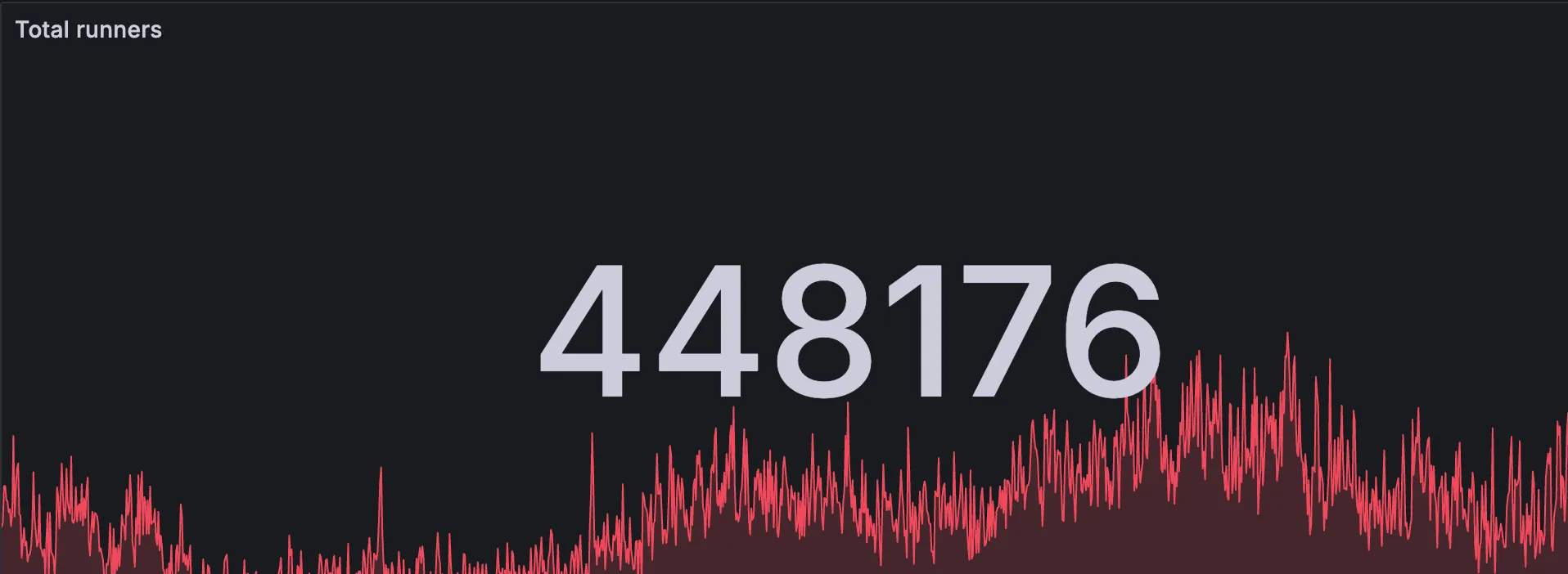
RunsOn stats showing 990k total runners in a single day

We’ve hit a new record: 990,000 jobs processed in a single day across all RunsOn users! We’re knocking on the door of 1 million daily jobs.

Just a few months ago we celebrated reaching 600k jobs per day. The growth to nearly 1 million daily jobs shows the momentum behind self-hosted GitHub Actions runners done right.

  1. Massive cost savings: Up to 10x cheaper than GitHub-hosted runners
  2. Better performance: Dedicated resources mean faster builds
  3. Full control: Run on your own AWS infrastructure with your choice of instance types
  4. Simple setup: Get started in minutes with CloudFormation

We’re excited to be so close to the 1 million jobs per day milestone. This growth is driven by teams of all sizes discovering that self-hosted runners can be simple, reliable, and cost-effective.

Thank you to everyone who trusts RunsOn for their CI/CD pipelines. The next milestone is within reach!

Ready to join? Get started today and see why thousands of developers have switched to RunsOn.

GitHub to charge $0.002/min for self-hosted runners starting March 2026

Update Dec 17th 2025: GitHub has suspended the fee for now.

GitHub recently announced that starting March 2026, they will begin charging $0.002 per minute for jobs running on self-hosted runners, including those managed by e.g. Actions Runner Controller (ARC) or other solutions like RunsOn.

Until now, self-hosted runners have been free to use on GitHub Actions - you only paid for your own infrastructure costs. Starting March 2026, GitHub will add a per-minute fee on top of your infrastructure costs for any job running on a self-hosted runner.

For context:

  • $0.002/min = $0.12/hour = $2.88/day for a runner running 24 hours
  • For 40,000 minutes/month: additional $80/month in GitHub fees
  • For 100,000 minutes/month: additional $200/month in GitHub fees

RunsOn will continue to provide significant cost savings compared to GitHub-hosted runners, even with this additional fee. However, the savings margin will be reduced for some runner configurations.

To help you understand the impact, we’ve updated our pricing tools:

Our pricing page now includes a toggle to show prices with or without the GitHub self-hosted runner fee. This lets you compare:

  • Current pricing (without the fee)
  • Post-March 2026 pricing (with the $0.002/min fee included)

The pricing calculator has also been updated with the same toggle. You can now see exactly how much you’ll save with RunsOn both before and after the fee takes effect.

Even with the additional GitHub fee, RunsOn remains significantly cheaper than GitHub-hosted runners for most configurations:

  • Spot instances: Still deliver 60-90% savings depending on runner size
  • On-demand instances: Still deliver 30-60% savings for most configurations
  • Larger runners: The bigger the runner, the more you save (GitHub’s hosted runner pricing scales up faster than AWS EC2 pricing)

The fee has a larger impact on smaller runner sizes where the base cost is lower. For 2-CPU runners, the $0.002/min fee represents a larger percentage of the total cost.

  1. Check your current usage: Review your GitHub Actions minutes to understand your monthly consumption
  2. Use our calculator: Try the updated calculator with the fee toggle enabled to see your projected costs
  3. Consider runner sizes: Larger runners provide better value as the fee is fixed per minute regardless of runner size
  4. Use spot instances: AWS spot instances remain the most cost-effective option

RunsOn is now handling more than 600k jobs per day

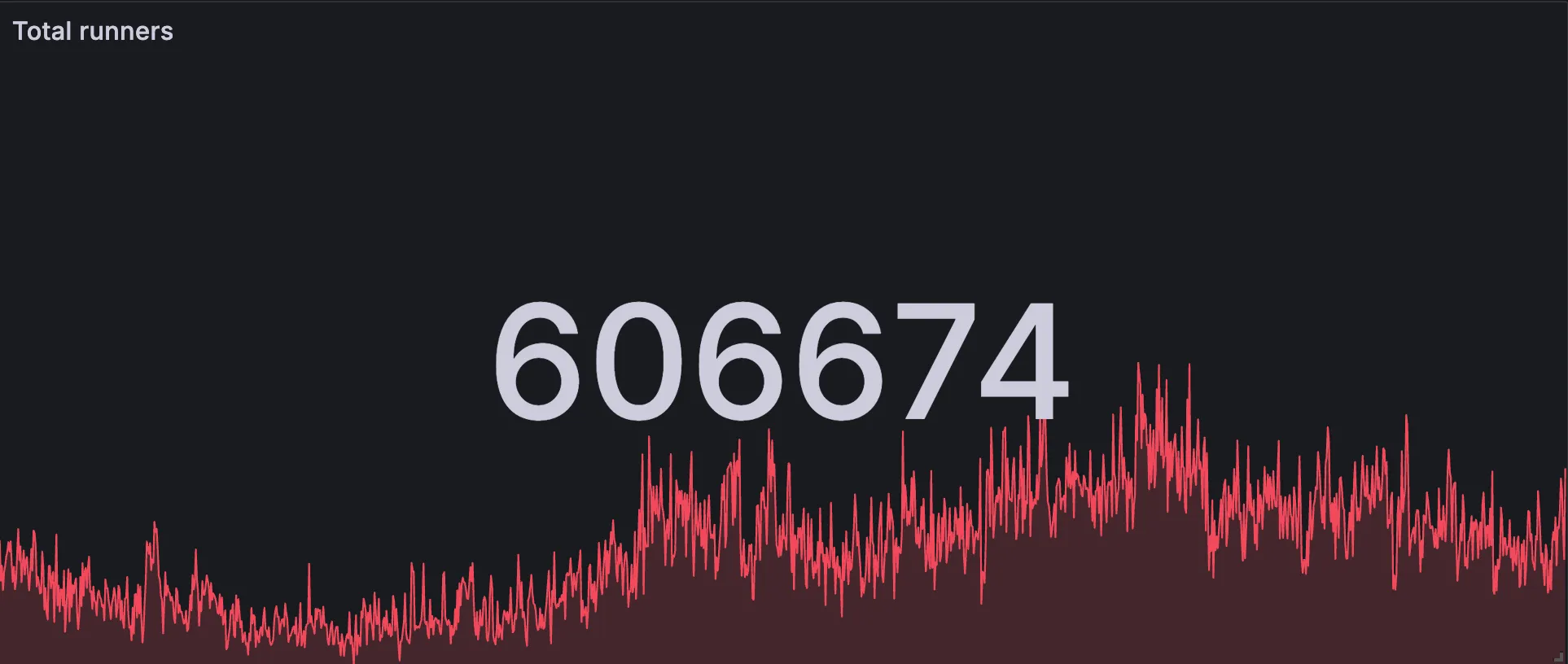
RunsOn stats showing 606,674 total runners

Another milestone reached: RunsOn is now processing over 600,000 jobs per day across all users! 🚀

Less than two months after hitting the 400k mark, we’ve grown by 50% to reach 606,674 daily jobs. This rapid growth demonstrates the increasing demand for reliable, cost-effective GitHub Actions runners. Organizations are discovering that self-hosted runners don’t have to be complex or expensive when using the right solution.

  1. Cost savings: Teams are saving up to 10x on their CI costs compared to GitHub-hosted runners
  2. Performance: Faster builds with dedicated resources and optimized configurations
  3. Flexibility: Choose your exact instance types and configurations
  4. Simplicity: Deploy in minutes, not days, with our streamlined setup

As we continue to scale, we’re focused on:

  • Improving performance monitoring and insights
  • Faster boot times for runners

Thank you to all our users who trust RunsOn for their critical CI/CD workflows. Here’s to the next milestone! 🎯

Want to join the thousands of developers already using RunsOn? Get started today and see why teams are switching to RunsOn for their GitHub Actions needs.

Why smart developers choose ephemeral runners (and you should too)

Here’s a question that separates senior engineers from the rest: Should your GitHub Actions runners live forever or die after each job?

If you answered “live forever,” you’re probably still debugging why your CI randomly fails on Tuesdays.

Long-lived runners feel intuitive. Spin up a VM, register it with GitHub, let it churn through jobs. No startup overhead, no provisioning delays. It’s the CI equivalent of keeping your laptop running 24/7 because “booting takes too long.”

But here’s what actually happens:

  • Week 1: “Our runners are blazing fast!”
  • Week 3: “Why do tests pass locally but fail in CI?”
  • Week 6: “Let’s restart all runners and see if that fixes it.”
  • Week 12: “We need a dedicated person to babysit our CI infrastructure.”

Sound familiar?

The four horsemen of long-lived runner apocalypse

Section titled “The four horsemen of long-lived runner apocalypse”

Your runner accumulates garbage like a browser with 847 open tabs. Docker layers, npm caches, environment variables, temp files—each job leaves traces. Eventually, Job #847 fails because Job #23 left some Node modules lying around.

Memory fragments. Disk fills up. CPU gets pinned by zombie processes. What started as a c5.large performing like a c5.large slowly becomes a c5.large performing like a t2.micro having an existential crisis.

That environment variable someone set for debugging last Tuesday? Still exported. That SSH key generated for a one-off deployment? Still in ~/.ssh. Your “clean” runner is basically a museum of security vulnerabilities.

Bugs that only appear after the runner has processed exactly 47 jobs involving TypeScript compilation. Good luck reproducing that locally.

Ephemeral runners are the Marie Kondo approach to CI: if it doesn’t spark joy (i.e., it’s not your current job), thank it and throw it away.

Every job gets:

  • A pristine environment identical to your base image
  • Zero state from previous executions
  • Consistent resource allocation
  • Perfect isolation from other workloads

The math is simple:

  • Long-lived: Pay for 24/7 × N runners × mysterious overhead
  • Ephemeral: Pay for actual job runtime × spot pricing discount

The classic objection: “Ephemeral runners are slow because of boot time!”

This is 2025 thinking with 2015 assumptions. Modern ephemeral runners boot in under 30 seconds. Your Docker build probably takes longer to download base images.

Plus, what’s worse: 30 seconds of predictable startup time, or 3 hours debugging why your integration tests only fail on runner-07 when Mars is in retrograde?

We’ve processed millions of jobs with this approach. Here’s how we make it work:

  • 30-second boot times with optimized AMIs and provisioned network throughput
  • Spot instance compatibility for 75% cost savings
  • One runner per job ensures perfect isolation
  • Zero operational overhead because there’s no state to manage

When your job finishes, the runner gets terminated. No cleanup scripts, no monitoring dashboards, no 3 AM alerts about runner-14 being “unhealthy.”

The architecture your future self will thank you for

Section titled “The architecture your future self will thank you for”

Long-lived runners are like global variables in code—they seem convenient until they’re not, and by then you’re too deep to refactor easily.

Ephemeral runners are like pure functions: predictable inputs, predictable outputs, no side effects. The kind of architecture that lets you sleep soundly knowing your CI isn’t a ticking time bomb.

Your security team gets perfect isolation. Your finance team gets usage-based costs. Your developers get consistent, reproducible builds. Everyone wins except the person who has to maintain the old system (which is no longer you).

If you’re still running long-lived CI infrastructure in 2025, you’re optimizing for the wrong metrics. You’re choosing theoretical performance over actual reliability, imaginary cost savings over real operational simplicity.

Smart money is on ephemeral. Smart developers choose tools that scale without accumulating technical debt.

Make the smart choice. Try RunsOn today.

The true cost of self-hosted GitHub Actions - Separating fact from fiction

In recent discussions about GitHub Actions runners, there’s been some debate around the true cost and complexity of self-hosted solutions. With blog posts like “Self-hosted GitHub Actions runners aren’t free” and various companies raising millions to build high-performance CI clouds, it’s important to separate fact from fiction.

It’s true that traditional self-hosted GitHub Actions runner approaches come with challenges:

  • Operational overhead: Maintaining AMIs, monitoring infrastructure, and debugging API issues
  • Hidden costs: Infrastructure expenses, egress charges, and wasted capacity
  • Human costs: Engineering time spent on maintenance rather than product development

However, these challenges aren’t inherent to self-hosted runners themselves. They’re symptoms of inadequate tooling for deploying and managing them.

At RunsOn, we’ve specifically designed our solution to deliver the benefits of self-hosted GitHub Actions runners without the traditional downsides:

While some providers claim to eliminate maintenance, they’re actually just moving your workloads to their infrastructure—creating new dependencies and security concerns. RunsOn takes a fundamentally different approach:

  • Battle-tested CloudFormation stack: Deploy in 10 minutes with a simple template URL.
  • Zero Kubernetes complexity: Unlike Actions Runner Controller (ARC), no complex cluster management.
  • Scales to zero: No jobs in queue? No cost. When a job comes up, RunsOn spins up a new runner and starts the job in less than 30s.
  • Automatic updates: Easy, non-disruptive upgrade process.
  • No manual AMI maintenance: Regularly updated runner images.

When third-party providers advertise “2x cheaper” services, they’re comparing themselves to GitHub-hosted runners—not to true self-hosted solutions. With RunsOn:

  • Up to 90% cost reduction compared to GitHub-hosted runners.
  • AWS Spot instances provide maximum savings (up to 75% cheaper than on-demand).
  • Use your existing AWS credits and committed spend.
  • No middleman markup on compute resources.
  • Transparent licensing model, with a low fee irrespective of the number of runners or job minutes you use.

Many third-party solutions gloss over a critical fact: your code and secrets are processing on their infrastructure. RunsOn:

  • 100% self-hosted in your AWS account—no code or secrets leave your infrastructure.
  • Ephemeral VM isolation with one clean runner per job.
  • Full audit capabilities through your AWS account.
  • No attack vectors from persistent runners.

High-performance CI doesn’t require VC-funded cloud platforms:

  • 30% faster builds than GitHub-hosted runners.
  • Flexible instance selection with x64, ARM64, GPUs, and Windows support.
  • Unlimited concurrency (only limited by your AWS quotas).
  • Supercharged caching with VPC-local S3 cache backend (5x faster transfers).

The often-cited “human cost” of self-hosted runners assumes significant ongoing maintenance. With RunsOn:

  • 10-minute setup with close to zero AWS knowledge required.
  • No ongoing maintenance burden for your DevOps team. Upgrades are one click away, and can be performed at your own pace.
  • No infrastructure to babysit or weekend emergency calls.
  • No complex debugging of runner API issues.

Let’s address some specific claims from recent competitor blog posts:

Claim: “Maintaining AMIs is time-consuming and error-prone”

Section titled “Claim: “Maintaining AMIs is time-consuming and error-prone””

Reality: RunsOn handles all AMI maintenance for you, with regularly updated images that are 100% compatible with GitHub’s official runners. If you want full control, we also provide templates for building custom images.

Claim: “Self-hosting means babysitting infrastructure”

Section titled “Claim: “Self-hosting means babysitting infrastructure””

Reality: RunsOn uses fully managed AWS services and ephemeral runners that are automatically recycled after each job. There’s no infrastructure to babysit.

Claim: “You’ll need to become an expert in GitHub Actions”

Section titled “Claim: “You’ll need to become an expert in GitHub Actions””

Reality: With RunsOn, you only need to change one line in your workflow files—replacing runs-on: ubuntu-latest with your custom labels. No GitHub Actions expertise required.

Claim: “High-performance CI requires third-party infrastructure”

Section titled “Claim: “High-performance CI requires third-party infrastructure””

Reality: RunsOn provides high-performance CI within your own AWS account, with benchmarks showing 30% faster builds for x64 workloads than GitHub-hosted runners and full compatibility with the latest instance types and architectures.

For arm64 workfloads, AWS is currently the leader in CPU performance.

Self-hosted GitHub Actions runners can be complex and costly, if you’re using the wrong approach. But with RunsOn, you get all the benefits of self-hosting (cost savings, performance, security) without the traditional drawbacks.

Before making assumptions about the “true cost” of self-hosted runners, evaluate solutions like RunsOn that have specifically solved these challenges. Your developers, security team, and finance department will all thank you.

Get started with RunsOn today!

GitHub Actions are slow and expensive, what are the alternatives?

Note: this is a recording of a similar talk given for a DevOps meetup on May 16, Rennes, France. You’ll find a generated transcript summary below, but you probably want to watch the video instead.

Play

Hello everyone and thanks for coming to this presentation on GitHub Actions and how to make it faster and 10x cheaper. But first a brief primer on GitHub Actions and especially the good parts.

GitHub Actions is a way to run workflows automatically whenever you push code or open a pull request or do anything on your repository.

It has very high adoption, a flexible workflow syntax, and a large choice of architectures so you can run workflows targeted at Linux x64, macOS, Windows, so it’s quite versatile and really useful.

Here are some major issues with GitHub Actions:

  • Performance and Cost: The default runners on GitHub are pretty weak, sporting just two cores that are both slow and expensive, costing over $300 a month if used non-stop. On the other hand, alternatives like Buildjet, Warpbuild, and UbiCloud offer quicker and cheaper services.

  • Caching and Compatibility Issues: GitHub’s caching tops out at 100MB/s, which can bog down workflows involving large files. Also, there’s no full support for ARM64 runners yet —- they’re still in beta —- slowing down builds that need multiple architectures.

  • Resource Optimization and Time Waste: GitHub’s weaker machines mean you often have to spend a lot of time fine-tuning your test suites to get decent run times. This eats up a lot of engineering hours that could be saved by switching to more robust runners from other providers or by setting up your own.

Self-hosted runners offer a practical solution for those looking to speed up their builds and reduce costs. By setting up your own machines and configuring them with GitHub’s runner agent, you can achieve faster build times at a lower price.

When using non-official runners, you can choose among 3 levels:

  • artisanal on-premise
  • productized on-premise
  • third-party providers

This approach, which I’ll call ‘artisanal on-premise’, involves using a few of your own servers and register them with GitHub. It’s cost-effective and manageable for a small number of machines but has limitations such as limited concurrency, maintenance requirements, security risks, and lack of environment consistency with GitHub’s official runners.

For a more robust setup, consider the ‘productized on-premise’ approach. This involves similar self-hosting principles but requires additional software like the Action Runner Controller or the Philips Terraform project to help manage the runners. This setup offers better hardware flexibility and scalability, as it can dynamically adjust the number of virtual machines based on demand. However, it requires more expertise to maintain and still lacks full image compatibility with GitHub’s official runners, necessitating custom Docker images or AMIs.

The final option is to use third-party providers for more affordable machines. These providers handle maintenance, so you just pay for the service. Most support official images, and they typically offer a 50% cost reduction. However, using these services means you’ll need to share your repository content and secrets, which could be exposed if there’s a security breach. The hardware options are limited; you can choose the number of CPUs but not specific details like the processor type, disk space, or GPU. Additionally, if you need more than 64 CPUs concurrently, extra fees may apply. Often, these services are hosted in locations with suboptimal network speeds.

Here’s a quick overview of the market options for GitHub Actions alternatives:

  • Third-Party SaaS: There’s a wide variety of third-party services available, with new options emerging almost monthly.
  • Fully On-Premise: Options include the Action Runner Controller and the Terraform provider. AWS CodeBuild is a newer addition that allows you to run managed runners within your AWS infrastructure.
  • Hybrid Providers: These offer a mix of on-premise and SaaS solutions. You provide the hardware hosted in your infrastructure, but management is handled through their control plane.

While searching for a cost-effective and efficient self-hosted solution, I found the fully on-premise options challenging to set up, slow to start, and with lengthy queuing times. Additionally, AWS CodeBuild, despite its advantages, is costly and comes with its own set of limitations.

I’ve been developing RunsOn, a new software aimed at creating a more affordable and efficient on-premise GitHub Actions Runner. Here’s a quick rundown:

  • Accessibility: RunsOn is free for individual and non-commercial use, with paid licenses available for commercial projects.
  • Core Features Desired:
    • Speed and Cost Efficiency: I aimed for faster and cheaper runners.
    • Scalability: Ability to handle numerous jobs concurrently without limitations.
    • Compatibility: Seamless integration with existing GitHub workflows by ensuring full image compatibility with official runners.
    • Low Maintenance: Minimal engineering oversight required, automating most of the operational aspects.
  • Additional Nice-to-Have Features:
    • Flexible instance type selection (CPU, RAM, disk, GPU).
    • Support for both x64 and arm64 architectures, and potentially macOS.
    • Enhanced handling of caches and Docker layers.
    • Easy installation and upgrades.

Overall, the goal is to make RunsOn a robust, user-friendly solution that enhances the efficiency of running automated workflows.

  • Speed: To enhance speed, select providers with superior CPUs like Hetzner, AWS, or OVH. RunsOn uses AWS for its diverse instance choices and spot pricing, scoring 3,000 in the CPU PassMark benchmark.
  • Cost Efficiency: For cost savings, consider using Hetzner for artisanal setups or AWS EC2 spot instances for productized solutions. Spot instances can be up to 75% cheaper than on-demand prices, fitting well with the short-lived nature of most CI jobs. Utilize the Create Fleet API from EC2 to minimize spot interruptions by selecting instances from the least interrupted pools.

Key points on scalability for RunsOn:

  • Simple and Dynamic: RunsOn launches an ephemeral EC2 instance for each job, which is terminated after the job completes. This approach keeps the system simple and responsive.
  • Concurrency Limits: The only limits to how many jobs you can run concurrently are your AWS quotas.
  • Optimized Queuing Times: By optimizing base AMIs and using provisioned network throughput for EBS, RunsOn achieves queuing times of around 30 seconds. This is competitive with GitHub’s 12 seconds and better than many third-party providers.
  • Stable Performance Under Load: Extensive testing with clients, such as Alan, shows that even with bursts of 100 or more jobs, the queuing times remain stable.

So basically, I wanted to do just this: change one line, and my workflow should still work. This is probably one of the hardest parts because you have to make compatible OS images, in my case for EC2, and nobody did this, or nobody published it at least.

So in my case, thankfully, GitHub publishes the Packer templates for the Runner images on Azure, so I just ported them for AWS, and this is now available for anyone to use. You can find the links here.

The final feature, low maintenance, and so as you can see, the architecture diagram has changed a bit since the last slide, but basically what I use for RunsOn is just managed services everywhere, and cheap services. So I have basically one CloudFormation stack which provisions an SQS queue, an SNS alert topic, a CloudWatch logs and metrics, and some S3 buckets, and then the RunsOn server is running on the AppRunner AWS service, which is really a cheap way to run containers on AWS. I recommend you check that out, and yeah, on the VM there is a small RunsOn agent that launches to configure the VM and then register with GitHub, and all that stack, like if you have a reasonable number of jobs, it costs only about one or two dollars a month, which is pretty impressive.

Here’s a quick overview of the additional features and real-world results of RunsOn:

  • Flexible Instance Selection: Users can customize their VM specifications such as CPU, RAM, and disk space directly in their workflows.
  • Architecture Support: RunsOn supports both ARM64 and AMD64 architectures. macOS support is currently unavailable due to licensing constraints.
  • Easy Installation and Upgrades: RunsOn offers a one-click installation and upgrade process using a template URL.
  • Enhanced Caching: By leveraging AWS’s S3, RunsOn provides up to five times faster caching and supports caching Docker layers.
  • Custom Images and Full SSH Access: Users can preload software on custom AMIs and have full SSH access to their Runners, with options for private networking and static EIPs.
  • Real-World Impact: RunsOn has significantly reduced costs and increased speed for clients, handling up to 500,000 jobs across various users, from small to large-scale operations.

Future enhancements for RunsOn include:

  • Cost Transparency: We plan to make CI costs more visible to developers to highlight the financial and environmental impacts of running multiple jobs.
  • Efficiency Monitoring: Introducing reports to help determine if your Runners are sized appropriately, ensuring you’re not overpaying for unused resources.

GitHub Action runner images (AMI) for AWS EC2

As part of the RunsOn service, we automatically maintain and publish replicas of the official GitHub runner images images as AWS-formatted images (AMIs) in this repository: https://github.com/runs-on/runner-images-for-aws.

New images are automatically released every 2 weeks, and are slightly trimmed to remove outdated software, or (mostly useless) caches.

  • ubuntu22-full-x64
  • ubuntu22-full-arm64
  • ubuntu24-full-x64
  • ubuntu24-full-arm64
  • North Virginia (us-east-1)
  • Ohio (us-east-2)
  • Oregon (us-west-2)
  • Ireland (eu-west-1)
  • London (eu-west-2)
  • Paris (eu-west-3)
  • Frankfurt (eu-central-1)
  • Mumbai (ap-south-1)
  • Tokyo (ap-northeast-1)
  • Singapore (ap-southeast-1)
  • Sydney (ap-southeast-2)

For the x86_64 image, search for:

  • name: runs-on-v2.2-<IMAGE_ID>-*
  • owner: 135269210855

For instance, for the ubuntu22-full-x64 image, search for:

  • name: runs-on-v2.2-ubuntu22-full-x64-*
  • owner: 135269210855
  • SSH daemon is disabled by default, so be sure to enable it in a user-data script if needed.

You can find more details on https://github.com/runs-on/runner-images-for-aws.

Use GitHub App manifests to symplify your GitHub App registration flow

Clicking through the GitHub UI interface to register a GitHub App with the correct permissions and settings is tedious, and error-prone.

I recently discovered that you can automate all this with GitHub App manifests, which contain all the required details about your app. You can then submit it to GitHub and dynamically exchange the manifest with the App ID, Webhook Secret, and Private key.

On the client front, you simply need a way to POST the manifest to GitHub, using a state parameter that you generate:

<form action="https://github.com/settings/apps/new?state=abc123" method="post">
Register a GitHub App Manifest: <input type="text" name="manifest" id="manifest"><br>
<input type="submit" value="Submit">
</form>
<script>
input = document.getElementById("manifest")
input.value = JSON.stringify({
"name": "Octoapp",
"url": "https://www.example.com",
"hook_attributes": {
"url": "https://example.com/github/events",
},
"redirect_url": "https://example.com/redirect",
"callback_urls": [
"https://example.com/callback"
],
"public": true,
"default_permissions": {
"issues": "write",
"checks": "write"
},
"default_events": [
"issues",
"issue_comment",
"check_suite",
"check_run"
]
})
</script>

Upon submission, GitHub will redirect back to your site with a temporary code, that you can then exchange for the app secrets.

For RunsOn GitHub Action runners, I am using this feature so that you only need 2 clicks after installation to get your private RunsOn app registered into your own GitHub organization with all the correct settings.

With Probot, you can describe your GitHub App manifest in YAML, so this would look like:

# The list of events the GitHub App subscribes to.
default_events:
- workflow_job
- meta
default_permissions:
# required for registering runners
administration: write
# required to access config file
single_file: write
# required to access collaborators and repository metadata
metadata: read
# Organization members and teams.
# https://developer.github.com/v3/apps/permissions/#permission-on-members
members: read
# required to access workflow runs
actions: read
single_file_paths:
- ./.github/runs-on.yml
name: runs-on
# Set to true when your GitHub App is available to the public or false when it is only accessible to the owner of the app.
public: false

For more details, you can have a look at the Probot doc about this.