Skip to content

Blog

BuildJet Is Shutting Down. What Should GitHub Actions Teams Do Next?

BuildJet just announced it is shutting down in a post titled We are shutting down.

Their core reason is straightforward:

“The gap we set out to fill has largely closed, and we’ve decided to focus our efforts elsewhere.”

First, credit where it is due: BuildJet helped validate and grow the market for third-party GitHub Actions runner services.

If you are affected by the shutdown, this post covers:

  • what this likely says about the market,
  • how to evaluate your replacement options,
  • why RunsOn is a strong BuildJet alternative.

Is the GitHub Actions ecosystem consolidating?

Section titled “Is the GitHub Actions ecosystem consolidating?”

Short answer: probably yes.

GitHub has shipped steady improvements in hosted runners, larger runner options, and overall platform capabilities. That naturally compresses the space for thin wrappers around default runner infrastructure.

What remains valuable now is not just “hosted runners, but cheaper.” Teams increasingly need:

  • stronger workload-specific performance,
  • deeper control over hardware profiles,
  • predictable costs at scale,
  • better caching and Docker build performance,
  • security and isolation boundaries that match enterprise requirements.

This is exactly where infrastructure-native solutions can still create meaningful value.

What to look for in a BuildJet alternative

Section titled “What to look for in a BuildJet alternative”

If your team is migrating, avoid doing a like-for-like swap only on price. Check these five criteria:

  1. Runner flexibility: Can you choose exact CPU, RAM, architecture, disk, and GPU for each job?
  2. Real cache performance: Not just cache support, but measurable restore/save throughput.
  3. Docker build speed: Native Docker layer caching support for container-heavy pipelines.
  4. Architecture performance: Fast x64 and arm64 options with published benchmark data.
  5. Unit economics at scale: Meaningful savings at your real monthly minute volume, not just toy examples.

Why RunsOn is a strong alternative to BuildJet

Section titled “Why RunsOn is a strong alternative to BuildJet”

For teams that want high performance without giving up control, RunsOn is built for this exact use case.

You can choose runner shapes per job with granular control over CPU, RAM, architecture, disk, and GPU availability. This avoids overpaying for one-size-fits-all runners and lets each workflow use the right hardware profile.

2. Faster caching (including large caches)

Section titled “2. Faster caching (including large caches)”

RunsOn is built to accelerate CI workloads that depend heavily on dependency and build caches. In cache-heavy pipelines, this often becomes one of the biggest contributors to end-to-end runtime.

If your pipeline builds Docker images frequently, Docker layer caching support is essential. RunsOn provides dedicated options for this, reducing repeated image build time and registry churn.

RunsOn is optimized around machine families and configurations that improve real build performance for common CI workloads on both x64 and arm64.

For many workloads, especially when using EC2 spot instances correctly, RunsOn can reduce compute costs significantly versus GitHub-hosted runner pricing tiers.

Most teams can migrate incrementally without redesigning their entire CI system.

  1. Install RunsOn in your AWS account.
  2. Configure the GitHub App for target repositories.
  3. Replace BuildJet runner labels with RunsOn runner labels.
  4. Start with one busy workflow and compare queue time, runtime, and cost.
  5. Roll out by workload type (build, test, release) and tune runner sizing.

Example migration pattern:

# Example only: replace your BuildJet label with a RunsOn label.
runs-on: runs-on=${{ github.run_id }}/runner=4cpu-linux-x64

BuildJet announced its shutdown in its post We are shutting down, citing improvements in GitHub Actions that reduced the gap it originally targeted.

What is a good BuildJet alternative for GitHub Actions?

Section titled “What is a good BuildJet alternative for GitHub Actions?”

If you need stronger performance, flexible hardware configuration, and lower CI cost at scale, RunsOn is a strong option. It supports dynamic runner sizing, fast caching, Docker layer caching, arm64/x64 performance tuning, and can be significantly cheaper depending on workload.

Do I need to rewrite all workflows to migrate from BuildJet?

Section titled “Do I need to rewrite all workflows to migrate from BuildJet?”

Usually no. Most teams can migrate incrementally by replacing runner labels and validating each pipeline class (build/test/release) one by one.

BuildJet shutting down does look like a sign of market consolidation around GitHub Actions runner infrastructure.

But consolidation does not mean “only GitHub-hosted runners remain.” It means the bar is higher:

  • better performance per dollar,
  • better workload fit,
  • better operational control.

If your team needs those three outcomes, RunsOn is a practical next step.

Start here:

From freelancer to running ~1.5% of all GitHub Actions jobs: Building RunsOn as a solo founder

For years building CI/CD pipelines for clients, the same bottleneck kept showing up: runners that were slow, expensive, and unreliable.

And it was not just one client or platform. From Jenkins to Travis CI, the issues were identical. Even after GitHub Actions launched in 2019 and everyone switched because they were already on GitHub, the underlying problems stayed.

The machines were mediocre and cost way more than they should have.

Around that time, I was working with the CEO of OpenProject, whose developers had been complaining about CI for weeks. They were spending more time fixing obscure CI issues than building product. And when it did work, it was slow - test suites that took 20 to 30 minutes overall to run, and that was with heavy test sharding across multiple runners.

So we put together a task force to build CI that was fast, cheap, and most importantly, predictable.

Looking back, that is what started everything.

We started by evaluating what was already out there:

  • Third-party SaaS solutions were out because you are still handing your code and secrets to a third party. That is a non-starter for many teams.
  • Actions Runner Controller looked promising, but I did not have the time or desire to become a Kubernetes expert just to keep CI running.
  • Other tools like AWS CodeBuild and Bitbucket were expensive and not meaningfully faster or more reliable.

“Would I genuinely want this in my own workflow?” was the question guiding every decision, and none of those options passed.

So we self-hosted Actions on a few bare-metal Hetzner servers. Simple, fast, and under our control.

Or so we thought.

The setup worked great at first. But then we hit the classic problem with persistent hosts: maintenance. I was constantly writing cleanup scripts or chasing weird concurrency issues.

It was not ideal.

Then GitHub released ephemeral self-hosted runners. You could spin up a fresh VM for each job and auto-terminate it after. No concurrency overlap, no junk piling up over time.

But at the time it was still new. Webhook handling was flaky, and Hetzner instances could not be trusted to boot quickly. That is when I realized a more established platform like AWS made sense. I rewrote everything from scratch on the side, just to see how much better it could be (OpenProject later switched to it). The philosophy was:

  • Make it ephemeral: EC2s that auto-terminate, eliminating runner drift and cleanup toil.
  • Make it frictionless: use boring, managed AWS services wherever possible.
  • Make it cheap: App Runner for the control plane.

No warm pools (we have them now), no clever tricks. Just solid fundamentals.

That became the first real version of RunsOn.

A few months later, one early user hit 10,000 jobs in a single day.

It was Alan, who were also the first to show trust and sponsor the project.

I remember staring at the metrics thinking, “there is no way this is right.” Almost all of those jobs came from a single org. I did not realize one company could run that many jobs in 24 hours.

That is when it clicked: if one org could do 10k jobs, what would this look like at scale?

I panicked a little. My architecture was not going to cut it for much longer.

For the longest time I worried about provider limits. My experience with Hetzner and Scaleway taught me that spinning up 10+ VMs at once was asking for trouble: quotas, failed boots, stalled builds.

Alan hitting 10k jobs was actually a blessing. After some back-and-forth with AWS to raise EC2 quotas, we could finally spawn as many instances as we needed. That gave me the confidence to tell bigger prospects “yes, this will scale” without sweating it.

The AWS move also changed how I thought about the problem.

Initially I was laser-focused on compute performance: faster instances, quicker boot times. I was naive to think EC2 would be the main expense.

Then I looked at the bills for my own installation.

Network egress was eating me alive. A lot of workflows were hitting GitHub’s cache hard, which meant data transfer costs were way higher than expected.

So I said, “I am already on AWS. Why not use S3 for caching? Why not optimize AMIs to cut EBS?”

I built those features to save money. But they made everything faster too. S3 cache was quicker than GitHub’s native cache, and leaner images meant faster boots.

I was trying to fix a cost problem and accidentally unlocked better performance.

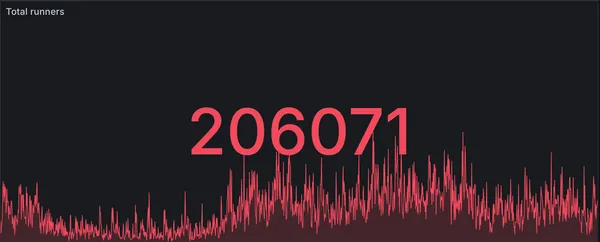
Here is a snapshot from our internal dashboard showing 1.18M total runners in a single day. Since each job spins up its own runner, that is over 1M jobs in 24 hours.

Internal dashboard showing 1.18M total runners in a single day
Internal dashboard snapshot showing 1.18M total runners in a day.

Based on publicly released GitHub Actions numbers, that puts RunsOn at roughly ~1.5% of GitHub Actions volume.

So yes, I will always be grateful to Tim and the team at Alan for trusting me to experiment and rewrite RunsOn to make it scale. That architecture unlocked 100k jobs, then 400k, then 800k, and now over 1 million jobs in a day.

I thought nailing the architecture would be the main thing.

Turns out developers want fast answers when something breaks. I have seen what happens when CI is blocked and support takes three days to respond. So I aim for hours, not days.

Handling support as a solo founder is stressful - especially when requests come in while I am asleep - but it is also rewarding to harden the product so those issues happen less and less.

Another principle that has stayed true: RunsOn should work without requiring people to change their workflow files (because I would not want to).

I also made the source code available for audit. Developers are rightfully skeptical of black boxes running their code. I get it. If I were evaluating a tool that had to handle thousands of jobs a day for an enterprise, I would want to see the code too.

Building devtools is always a challenge, because developers often have a high bar for such tools. But they are also the ones who will tell you exactly what is broken and what would make it better (looking at you, Nate).

That feedback loop is what made RunsOn what it is today.

The best scale tests come from customers who push you the hardest.

The biggest request I hear is cost visibility. People want to understand exactly what is costing them money and where to optimize. So I am building cost transparency features that show per-job and per-repo breakdowns.

Same thing with efficiency monitoring. If your jobs are taking longer than they should, you want to know why. That request is coming directly from users.

Every time someone pushes RunsOn into a new scale or use case, I learn something new about what breaks and what should exist. The customers who push the hardest are the ones who make it better for everyone else.

We are at about 1.18M jobs a day now. Let us see where the next million takes us.

If your CI is frustrating you, give RunsOn a try. I would love to hear what you think.

New record: RunsOn processes 990k jobs in a single day

RunsOn stats showing 990k total runners in a single day

We’ve hit a new record: 990,000 jobs processed in a single day across all RunsOn users! We’re knocking on the door of 1 million daily jobs.

Just a few months ago we celebrated reaching 600k jobs per day. The growth to nearly 1 million daily jobs shows the momentum behind self-hosted GitHub Actions runners done right.

  1. Massive cost savings: Up to 10x cheaper than GitHub-hosted runners
  2. Better performance: Dedicated resources mean faster builds
  3. Full control: Run on your own AWS infrastructure with your choice of instance types
  4. Simple setup: Get started in minutes with CloudFormation

We’re excited to be so close to the 1 million jobs per day milestone. This growth is driven by teams of all sizes discovering that self-hosted runners can be simple, reliable, and cost-effective.

Thank you to everyone who trusts RunsOn for their CI/CD pipelines. The next milestone is within reach!

Ready to join? Get started today and see why thousands of developers have switched to RunsOn.

GitHub to charge $0.002/min for self-hosted runners starting March 2026

Update Dec 17th 2025: GitHub has suspended the fee for now.

GitHub recently announced that starting March 2026, they will begin charging $0.002 per minute for jobs running on self-hosted runners, including those managed by e.g. Actions Runner Controller (ARC) or other solutions like RunsOn.

Until now, self-hosted runners have been free to use on GitHub Actions - you only paid for your own infrastructure costs. Starting March 2026, GitHub will add a per-minute fee on top of your infrastructure costs for any job running on a self-hosted runner.

For context:

  • $0.002/min = $0.12/hour = $2.88/day for a runner running 24 hours
  • For 40,000 minutes/month: additional $80/month in GitHub fees
  • For 100,000 minutes/month: additional $200/month in GitHub fees

RunsOn will continue to provide significant cost savings compared to GitHub-hosted runners, even with this additional fee. However, the savings margin will be reduced for some runner configurations.

To help you understand the impact, we’ve updated our pricing tools:

Our pricing page now includes a toggle to show prices with or without the GitHub self-hosted runner fee. This lets you compare:

  • Current pricing (without the fee)
  • Post-March 2026 pricing (with the $0.002/min fee included)

The pricing calculator has also been updated with the same toggle. You can now see exactly how much you’ll save with RunsOn both before and after the fee takes effect.

Even with the additional GitHub fee, RunsOn remains significantly cheaper than GitHub-hosted runners for most configurations:

  • Spot instances: Still deliver 60-90% savings depending on runner size
  • On-demand instances: Still deliver 30-60% savings for most configurations
  • Larger runners: The bigger the runner, the more you save (GitHub’s hosted runner pricing scales up faster than AWS EC2 pricing)

The fee has a larger impact on smaller runner sizes where the base cost is lower. For 2-CPU runners, the $0.002/min fee represents a larger percentage of the total cost.

  1. Check your current usage: Review your GitHub Actions minutes to understand your monthly consumption
  2. Use our calculator: Try the updated calculator with the fee toggle enabled to see your projected costs
  3. Consider runner sizes: Larger runners provide better value as the fee is fixed per minute regardless of runner size
  4. Use spot instances: AWS spot instances remain the most cost-effective option

Cloud-init tips and tricks for EC2 instances

Working extensively with RunsOn, I’ve spent considerable time with cloud-init, the industry-standard tool that automatically configures cloud instances on startup. Present on Ubuntu distributions on AWS, cloud-init fetches metadata from the underlying cloud provider and applies initial configurations. Here are some useful commands and techniques I’ve discovered for troubleshooting and inspecting EC2 instances.

When debugging instance startup issues, you often need to check what user-data was passed to your instance. Here are three ways to retrieve it:

The most reliable method is using the built-in cloud-init query command:

Terminal window
# View user data
sudo cloud-init query userdata
# View all instance data including user data
sudo cloud-init query --all

Cloud-init stores user-data locally after fetching it:

Terminal window
# User data is stored in
sudo cat /var/lib/cloud/instance/user-data.txt

3. Using the instance metadata service (IMDS)

Section titled “3. Using the instance metadata service (IMDS)”

You can also query the EC2 metadata service directly:

Terminal window
# IMDSv2 (recommended)
TOKEN=`curl -X PUT "http://169.254.169.254/latest/api/token" -H "X-aws-ec2-metadata-token-ttl-seconds: 21600"`
curl -H "X-aws-ec2-metadata-token: $TOKEN" http://169.254.169.254/latest/user-data
# IMDSv1 (legacy)
curl http://169.254.169.254/latest/user-data

Accessing all EC2 metadata without additional API calls

Section titled “Accessing all EC2 metadata without additional API calls”

Here’s a powerful tip: cloud-init automatically fetches all relevant data from the EC2 metadata API at startup and caches it locally. Instead of making multiple API calls, you can read everything from a single JSON file:

Terminal window
sudo cat /run/cloud-init/instance-data.json

This file contains a wealth of information about your instance. Let’s explore some useful queries:

Get comprehensive instance details:

Terminal window
sudo cat /run/cloud-init/instance-data.json | jq '.ds.dynamic["instance-identity"].document'

Output:

{
"accountId": "135269210855",
"architecture": "x86_64",
"availabilityZone": "us-east-1b",
"billingProducts": null,
"devpayProductCodes": null,
"imageId": "ami-0db4eca8382e7fc27",
"instanceId": "i-00a3d21a80694c44b",
"instanceType": "m7a.large",
"kernelId": null,
"marketplaceProductCodes": null,
"pendingTime": "2025-04-25T12:00:18Z",
"privateIp": "10.0.1.93",
"ramdiskId": null,
"region": "us-east-1",
"version": "2017-09-30"
}

Access all EC2 metadata fields:

Terminal window
sudo cat /run/cloud-init/instance-data.json | jq '.ds["meta-data"]'

This reveals extensive information including:

  • Network configuration (VPC, subnet, security groups)
  • IAM instance profile details
  • Block device mappings
  • Hostname and IP addresses
  • Maintenance events

Need just the public IP? Or the instance type? Use jq to extract specific fields:

Terminal window
# Get public IPv4 address
sudo jq -r '.ds["meta-data"]["public-ipv4"]' /run/cloud-init/instance-data.json
# Output: 3.93.38.69
# Get instance type
sudo jq -r '.ds["meta-data"]["instance-type"]' /run/cloud-init/instance-data.json
# Output: m7a.large
# Get availability zone
sudo jq -r '.ds["meta-data"]["placement"]["availability-zone"]' /run/cloud-init/instance-data.json
# Output: us-east-1b
# Get VPC ID
sudo jq -r '.ds["meta-data"]["network"]["interfaces"]["macs"][.ds["meta-data"]["mac"]]["vpc-id"]' /run/cloud-init/instance-data.json
# Output: vpc-03460bc2910d2b4e6

Understanding cloud-init and how to query instance metadata is crucial for:

  1. Troubleshooting: When instances fail to start correctly, checking user-data and metadata helps identify configuration issues
  2. Automation: Scripts can use this cached data instead of making API calls, reducing latency and API throttling
  3. Security: Accessing cached data avoids exposing credentials to the metadata service repeatedly
  4. Performance: Reading from local files is faster than HTTP requests to the metadata service

Cloud-init does more than just run your user-data script. It provides a comprehensive interface to instance metadata that’s invaluable for debugging and automation. Next time you’re troubleshooting an EC2 instance or writing automation scripts, remember these commands - they’ll save you time and API calls.